UIC-Miner Task
The UIC-Miner (Uplift in Categories Miner) finds conditions under which rare categories in a target attribute are proportionally boosted. It is designed for situations where a valuable but infrequent outcome — such as a fatal accident, a high-value sale, or a rare disease — needs to be identified and amplified despite its low base occurrence.
The core idea: rather than searching for conditions where a rare category appears alone (which may produce too few results to be actionable), UIC-Miner mixes the rare category with a related, more common one and searches for conditions where the combined weighted improvement is above a defined threshold.
Task creation is handled through a three-step wizard: Task Setup → Logic Configuration → Quantifiers.
Step 1 — Task Setup
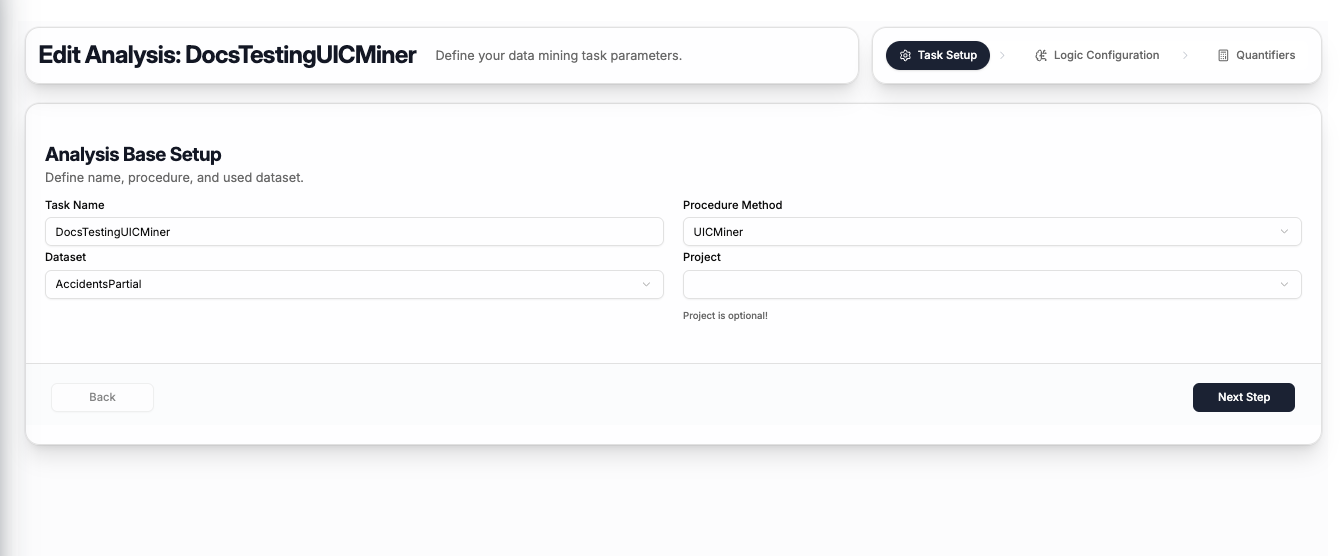
The first step captures the basic task information:
| Field | Description |
|---|---|
| Task Name | A name to identify this task |
| Procedure Method | Select UICMiner |
| Dataset | The dataset to mine — select from your uploaded datasets |
| Project | Optionally assign the task to a project (can be left empty) |
Click Next Step to proceed to logic configuration.
Step 2 — Logic Configuration
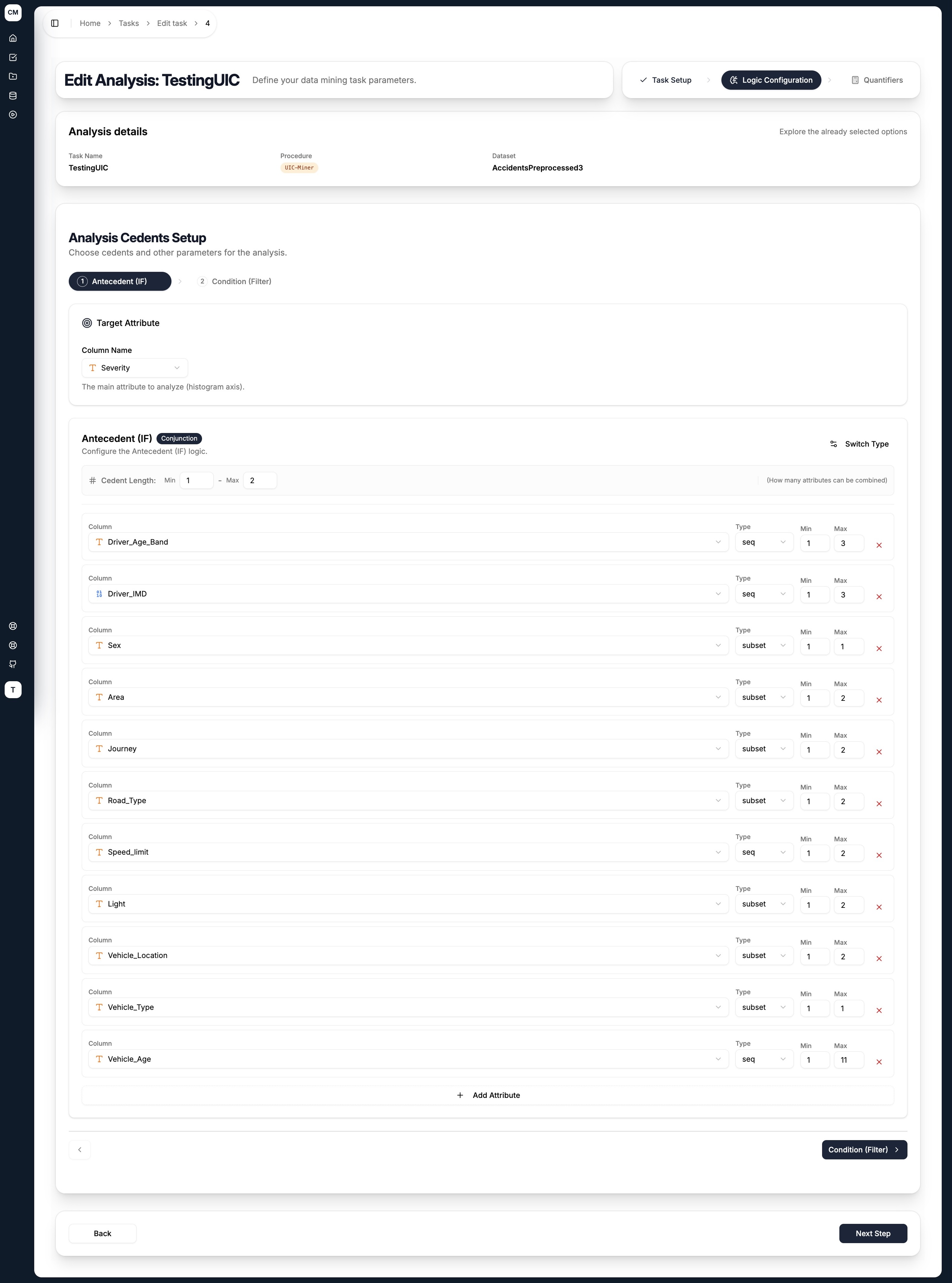
The UIC-Miner has two cedent tabs — Antecedent (IF) and Condition (Filter) — plus a Target Attribute selector shared with the CF-Miner.
Target Attribute
Select the categorical column whose category distribution you want to analyse and boost. The categories of this attribute are what the AAD Weights quantifier in Step 3 will be applied to.
Antecedent (IF)
The antecedent defines the conditions the miner explores. For each antecedent found, the miner evaluates the histogram of the target attribute within that subgroup and compares it to the baseline (either the full dataset or the condition subset).
Configure it the same way as any other cedent:
- Cedent Type — toggle between
Conjunction(AND) orDisjunction(OR) using the Switch Type button - Cedent Length (Min / Max) — controls how many attributes can be combined in a single antecedent
For each attribute added:
| Field | Description |
|---|---|
| Column | Select an attribute from the dataset |
| Type | How the attribute's values are grouped — see Literal Types below |
| Min / Max | The minimum and maximum number of values to combine for this attribute |
Condition (Filter)
An optional filter that restricts the dataset to a subset before mining begins. When set, the antecedent's histogram is compared against the condition subset rather than the full dataset.
Literal Types
| Type | Description |
|---|---|
subset | Any subset of the attribute's categories (unordered) |
seq | Sequences of consecutive ordered values |
lcut | Left cut — takes values from the left end of the ordered range |
rcut | Right cut — takes values from the right end of the ordered range |
Click Next Step to proceed to quantifier setup.
Step 3 — Quantifiers
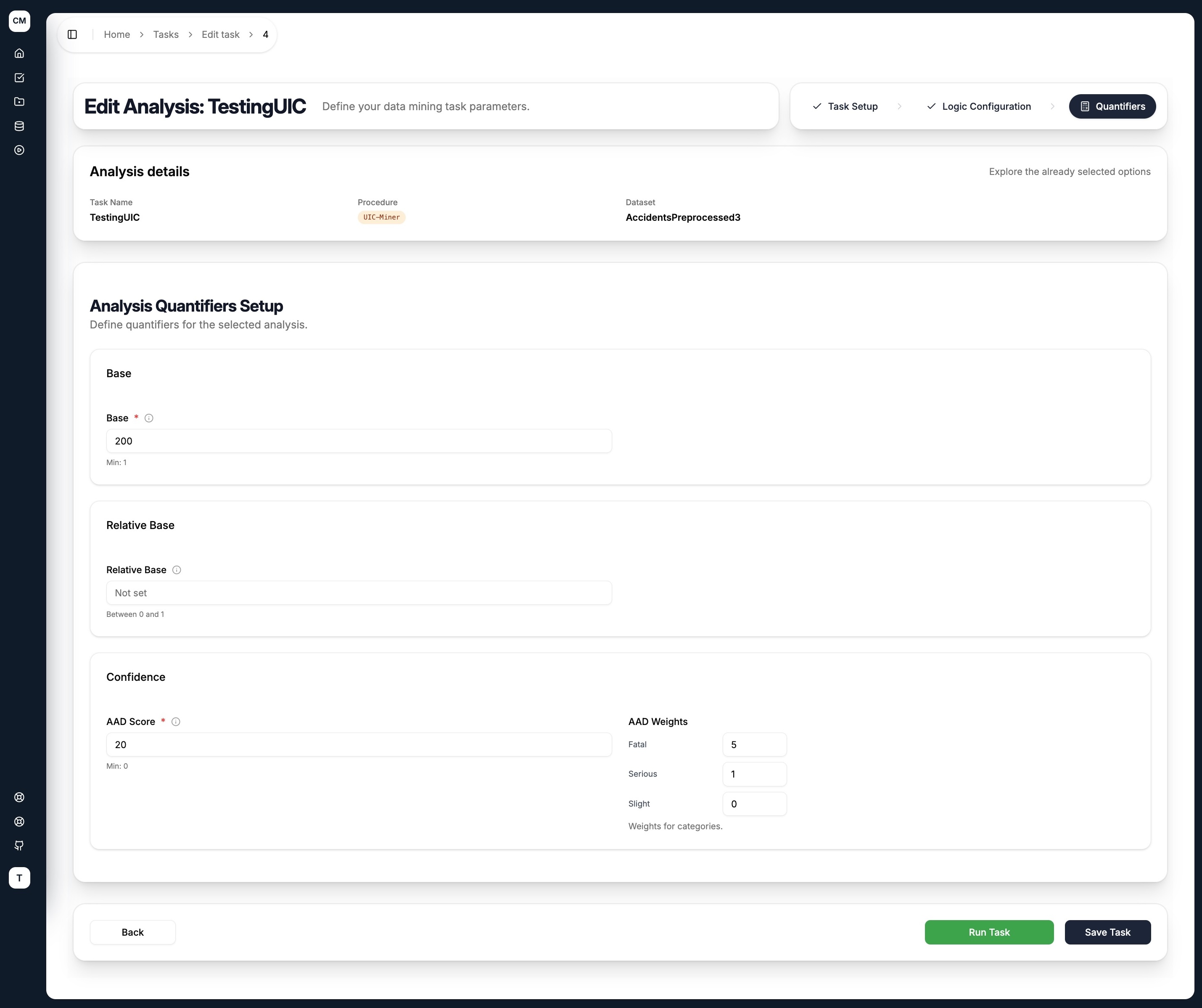
UIC-Miner uses a weighted scoring mechanism to rank how interesting a discovered antecedent is. Only rules meeting all specified conditions are returned.
Base
| Quantifier | Description |
|---|---|
| Base | Minimum number of records satisfying the antecedent |
| Relative Base | Minimum base as a fraction of the total dataset size |
Confidence (AAD Score)
| Quantifier | Description |
|---|---|
| AAD Score | Minimum weighted improvement score. Measures the overall uplift across all target categories, weighted by importance. Higher means more interesting rules. |
| AAD Weights | A comma-separated weight vector — one value per target category, in order. Categories with higher weights contribute more to the score. Set to 0 to exclude a category from scoring. |
How AAD Weights work
The weights tell the miner which categories matter most. For example, with a target of Severity having categories Fatal, Serious, Slight in that order:
5, 1, 0— Fatal is 5x more important than Serious, Slight is ignored1, 1, 0— Fatal and Serious matter equally, Slight is ignored5, 0, 0— only boost in Fatal counts
The miner computes the per-category improvement (how much the antecedent raises the occurrence of each category relative to the baseline), multiplies each by its weight, and sums them into a single aad_score. Only rules exceeding the AAD Score threshold are included in the results.
Submitting the Task
At the bottom of the quantifiers step, two actions are available:
- Save Task — saves the task configuration for later execution
- Run Task — saves the task and immediately dispatches it to the execution pipeline
Start with a moderate AAD Score threshold (e.g. 20) and assign the highest weight to your rarest but most valuable category. You can always raise the threshold to tighten the result set after seeing the initial output.