4ft-Miner Results
The 4ft-Miner is the core GUHA procedure for mining enhanced association rules of the form Antecedent → Succedent. It discovers rules supported by a wide range of statistical quantifiers, including confidence and support.
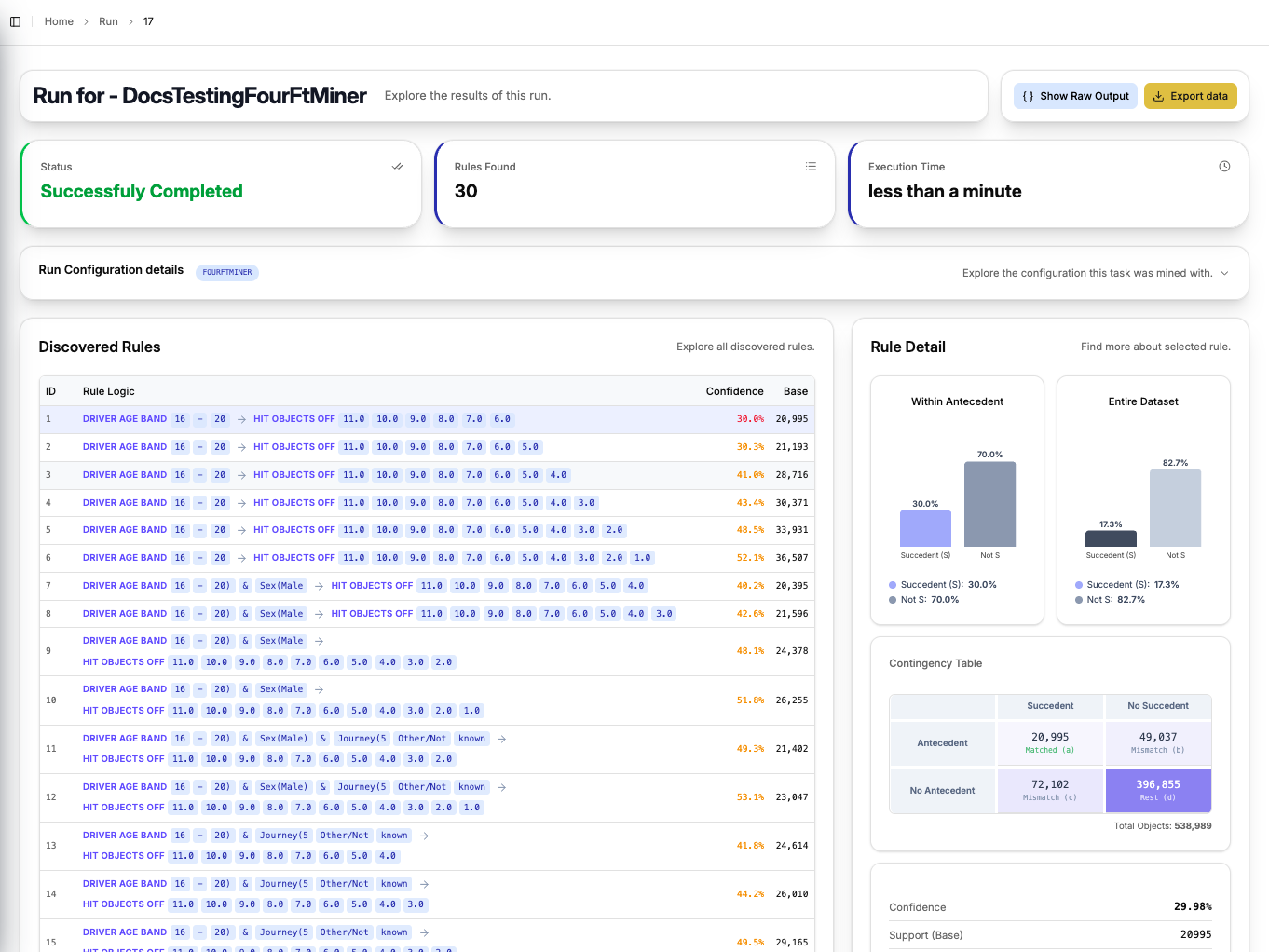
Run Summary
At the top of the page, three execution statistics are shown immediately:
| Field | Description |
|---|---|
| Status | Whether the run completed successfully |
| Rules Found | Total number of rules discovered |
| Execution Time | How long the mining process took |
The Run Configuration Details section below the summary is collapsible and shows the exact configuration the task was mined with — including the antecedent, succedent, and quantifier settings — so you do not need to navigate back to the task to review the setup.
Discovered Rules
The left panel lists all discovered rules in a scrollable table. Each rule is displayed as a colour-coded logical expression, with attribute values highlighted for readability. The table also shows:
- Confidence — the conditional probability of the succedent given the antecedent, colour-coded to indicate strength
- Base — the number of records matching the antecedent
Click any rule to load its detail in the right panel.
Rule Detail
Selecting a rule updates the Rule Detail panel on the right with the following components:
Bar Charts
Two bar charts compare the distribution of the succedent attribute:
- Within Antecedent — distribution among records matching the antecedent
- Entire Dataset — distribution across the full dataset
This side-by-side comparison makes it easy to spot whether the antecedent shifts the probability of the succedent compared to the baseline.
Contingency Table (Fourfold Table)
A fourfold contingency table breaking the dataset into four cells:
| Succedent | No Succedent | |
|---|---|---|
| Antecedent | Matched (a) | Mismatch (b) |
| No Antecedent | Mismatch (c) | Rest (d) |
Statistical Indicators
Key quantifiers for the selected rule:
| Indicator | Description |
|---|---|
| Confidence | P(Succedent | Antecedent) |
| Support (Base) | Number of records matching the antecedent |
Exporting Results
Use the Export data button in the top right to download the full result set. The Show Raw Output button displays the raw JSON response from the CleverMiner engine for advanced users.