Project Overview
Projects are a way to organise your work on the platform. Each project groups together its related tasks, runs, and datasets, giving you a clear workspace for a specific analytical goal.
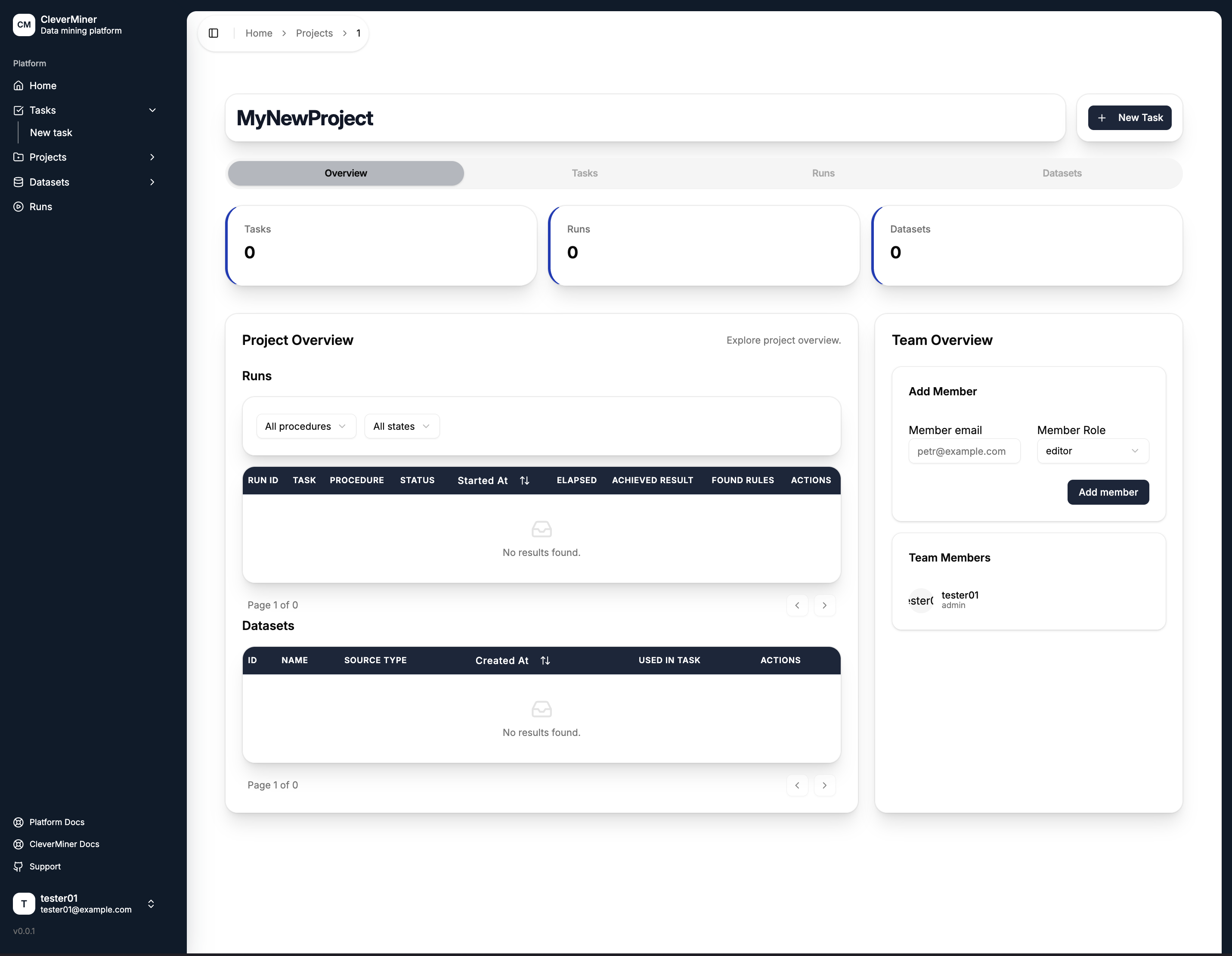
Summary Metrics
At the top of the project page, three counters show the current state of the project:
| Metric | Description |
|---|---|
| Tasks | Number of tasks created within this project |
| Runs | Number of runs executed under this project |
| Datasets | Number of datasets associated with this project |
Tabs
The project detail page is organised into four tabs:
| Tab | Description |
|---|---|
| Overview | Summary of runs, datasets, and team members |
| Tasks | All tasks belonging to this project |
| Runs | All runs executed within this project |
| Datasets | All datasets linked to this project |
Project Overview Tab
The Overview tab provides a quick snapshot of the project's activity. It displays the most recent Runs and Datasets in compact tables, so you can see the current state of the project without switching tabs.
Team Overview
On the right side of the Overview tab, the Team Overview panel lets you manage who has access to the project.
Adding a Member
Enter the member's email address, select their role (admin or editor), and click Add member. The invited user will gain access to the project based on their assigned role.
Team Members
All current members are listed below the add form, showing their username and role.
Use the + New Task button in the top right corner to quickly create a new task directly from within the project.